Context Bar
/context answers "what is filling my window" only when you ask. context-bar keeps the answer on screen: one stacked bar above the prompt, in the same colours /context uses.
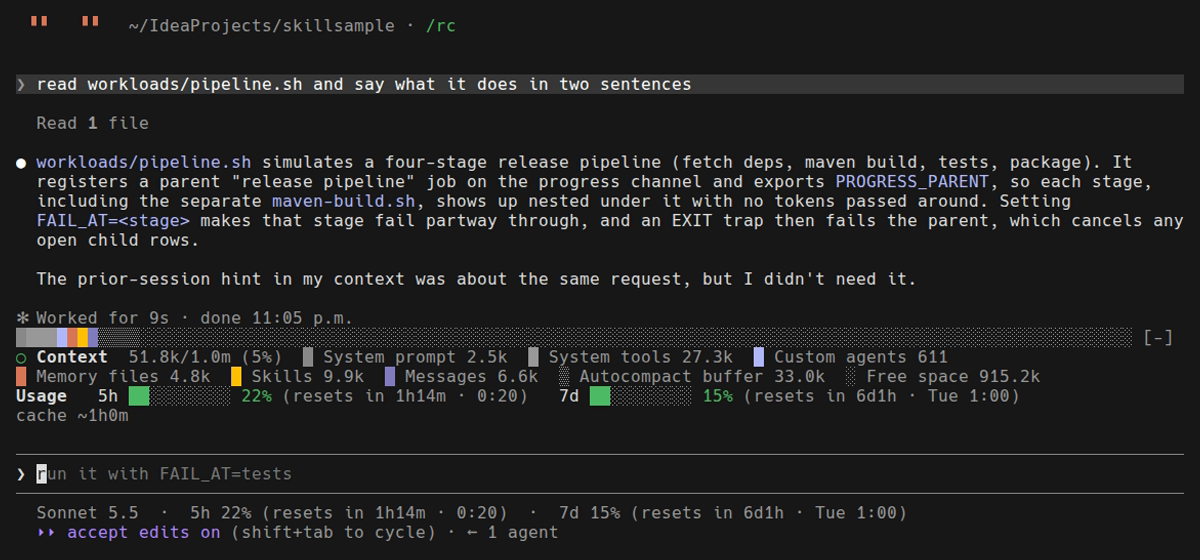
A real session, recorded. After one small turn the window is at 50.6k of 1.0m (5%); the legend names each segment.
It is a mod: code that draws inside Claude Code, with no skill and nothing for the model to read.
Install
/plugin install context-bar@alexmskillsIt needs a Claude Code build that loads hooks modules; see Mods → Install.
Use it
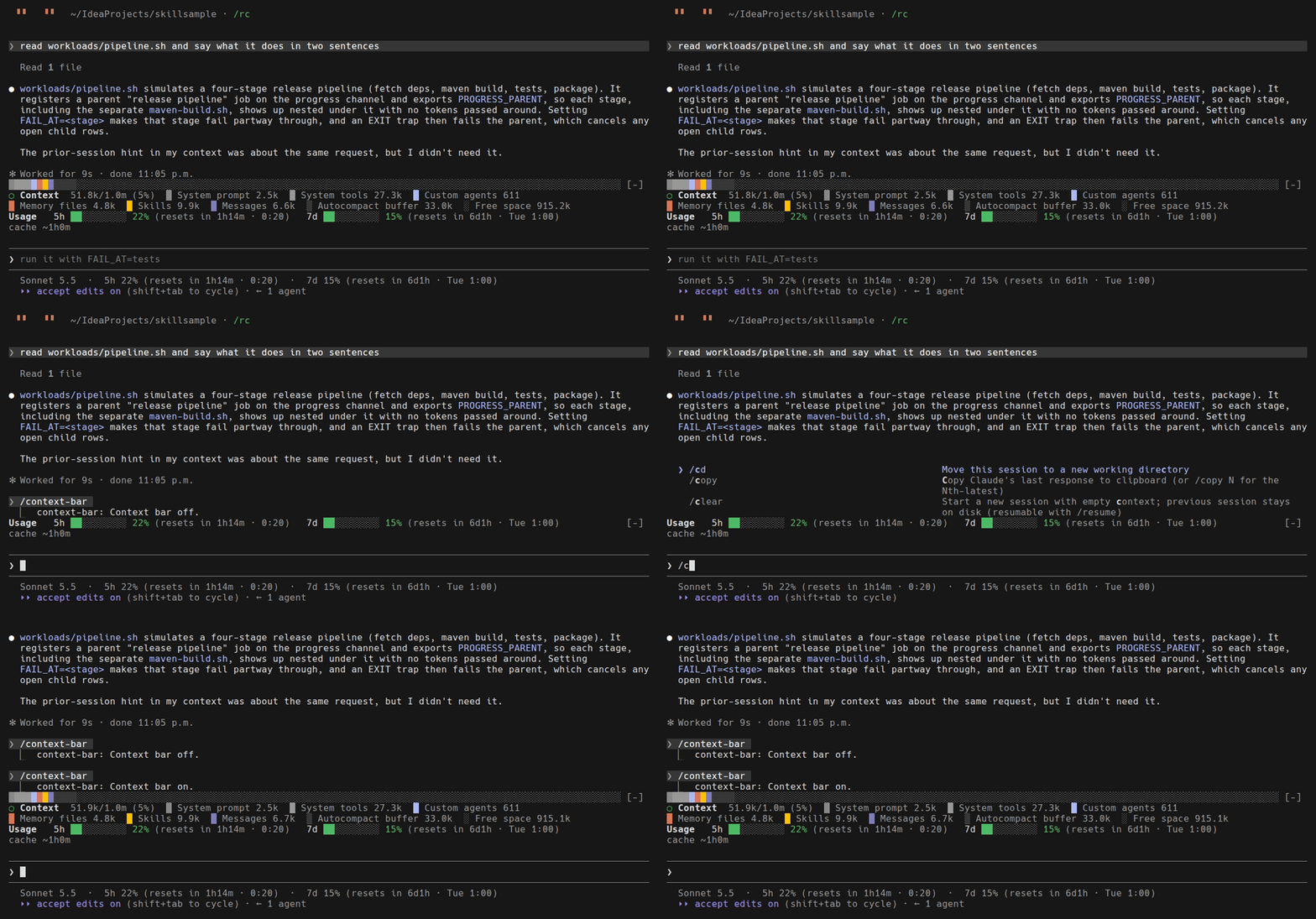
/context-barThe command turns the bar off and on. It starts on, and replies Context bar off. or Context bar on. so you can see which way it went.
What it draws
The bar. One row across the band above the prompt. Each category gets cells in proportion to its tokens, and any non-empty category gets at least one cell, so a small one never vanishes. The largest category absorbs the rounding, so the cells always add up to the full width.
| Cell | Drawn as | Meaning |
|---|---|---|
|
solid, in the category’s colour |
tokens in use: system prompt, tools, agents, memory files, skills, messages |
|
dimmed |
the autocompact buffer, held back so a compaction has room to run |
|
dimmed |
free space |
The legend. A second line opens with a one-cell pie (○ ◔ ◑ ◕ ●) showing how far the window is toward auto-compact — green while there is nothing to do, then the colour of the advice below — and the label Context. It then gives the total — 50.6k/1.0m (5%) — then each category with its colour swatch and token count, written the way /context writes them (611, 9.9k, 1.0m). On a narrow terminal the legend wraps onto more rows.
What is left out. Deferred tool schemas are not drawn, because they sit outside the window until a tool is loaded.
What is filling it: /context-bar top (0.2.0)
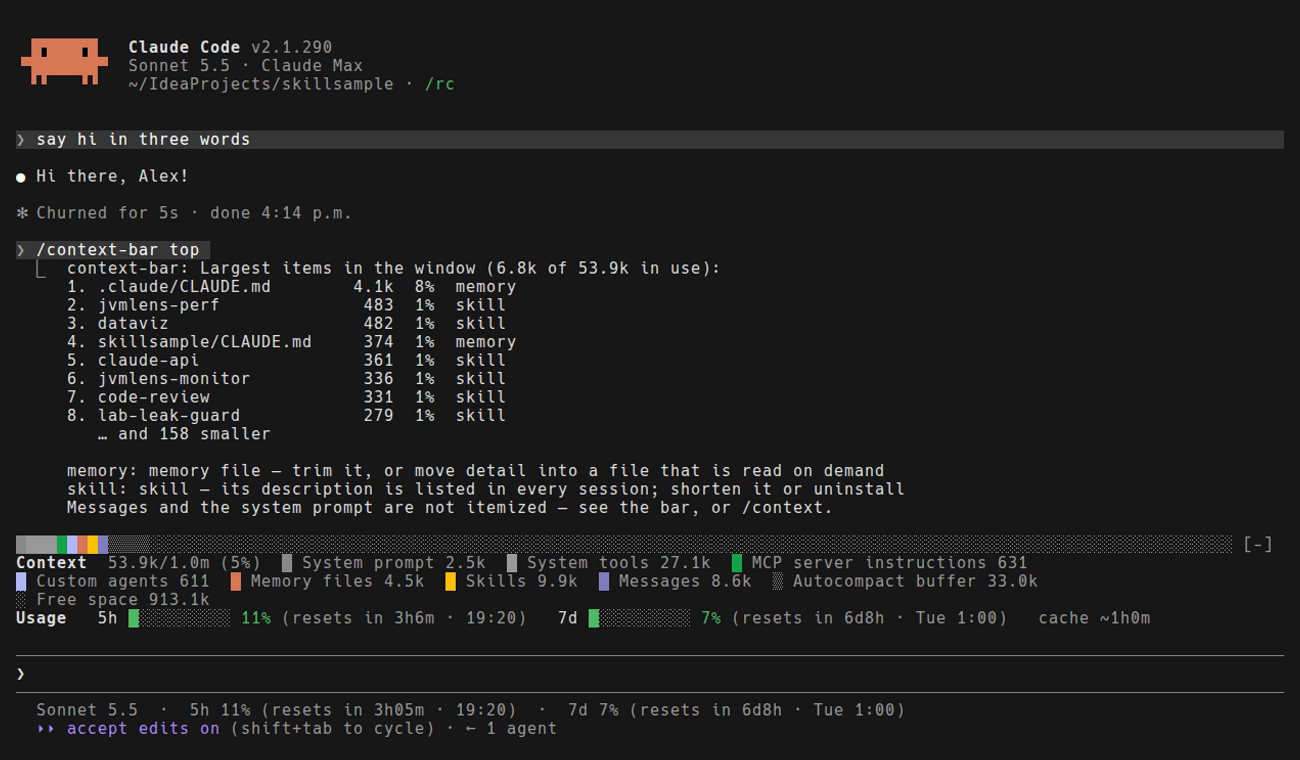
The bar shows categories — "Memory files 14.3k". That says where to look, not what to cut. /context-bar top ranks the individual items behind those categories:
-
Memory files are named with their folder, so a project
CLAUDE.mdand your global one are told apart. -
MCP tools are grouped by server, because a server is what you connect or disconnect. A tool whose schema is deferred is not in the window and is not counted.
-
Skills and custom agents are listed one by one; each one’s description is in every session.
-
Each kind shown comes with one line on what you can do about it.
Built-in tools, messages and the system prompt are not itemized — the engine reports those only as totals. It uses the same free local estimate as the bar, so it sends no token-count requests.
When to compact (0.2.0)
Compaction replaces the conversation with a summary. Done by hand at a stopping point, you pick the moment and can say what must be kept. Done automatically, it happens wherever the window happens to fill — often mid-task — and anything that lived only in the conversation survives as whatever the summary made of it.
The bar watches the distance to that point and adds one row when there is something worth saying. Below 70% of the way it says nothing: a bar that always has an opinion is one nobody reads.
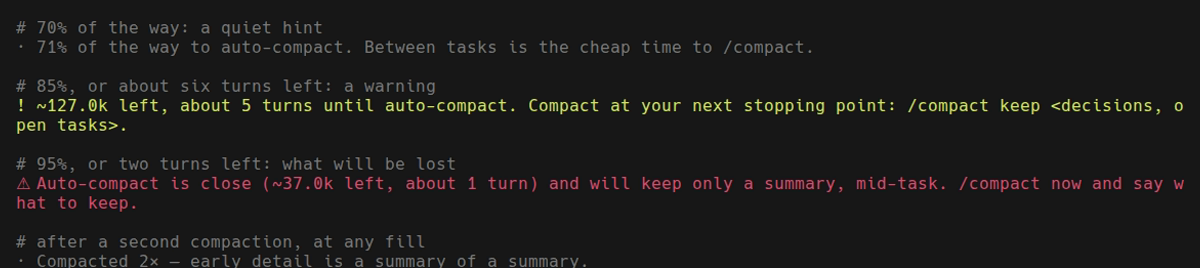
Rendered by the mod’s own advise() over sample readings; a live recording would need a session that is really 70%, 85% and 95% full.
| Level | When | What it says |
|---|---|---|
hint (dim) |
70% of the way to auto-compact |
Between tasks is the cheap time to |
warning (yellow) |
85% of the way, or about six turns left |
How many tokens and turns are left, and to compact at your next stopping point — with |
danger (red) |
95% of the way, or two turns left |
Auto-compact is close, will cut in mid-task, and will keep only a summary. Compact now and say what to keep. |
note (dim) |
after a second compaction, at any fill |
Early detail is now a summary of a summary — the point where it is worth re-stating a decision you still depend on. |
Three things about how it decides:
-
It measures to where auto-compact actually runs, not to the size of the model’s window. The engine reports that threshold; on a 1M window it sits some way below the top, and 70% of the way there can be 63% of the window.
-
Turns left comes from your own pace — the median of what the last five turns added, so one huge file read does not set it. A short runway raises the level on its own, because three big tool results can cover the last 30% in one go. The pace is only trusted once the window is half used: two large reads at the start of a session are not a trend.
-
With auto-compact off the limit is the window itself, and the wording changes to say so: compact or clear before a request fails.
It recommends; it never compacts for you. The row has no button, and nothing here runs /compact. It also makes no claim about answer quality at a given fill — that is not something a bar can measure.
The idea of nudging toward compaction before the window forces it comes from token-optimizer, which does a great deal more (checkpoints, restore, quality scoring). This is an independent, much smaller take: one row, arithmetic on figures the engine already reports, nothing stored.
When it updates
-
at session start,
-
after every turn,
-
after a compaction — the moment the picture changes most,
-
and when you switch it back on.
How it reads the numbers
It asks the session for the summary breakdown. summary is a local estimate: it sends no token-count requests, which is why a refresh after every turn is free. The cost is precision — the figures can differ slightly from /context, which counts exactly. Use the bar to see the shape of the window at a glance and /context when you need the exact number.
With other mods
The band above the prompt holds one tree, so context-bar draws its two rows and then whatever the other mods there draw. With usage-bar installed too, the rate-limit bars appear directly beneath the legend:
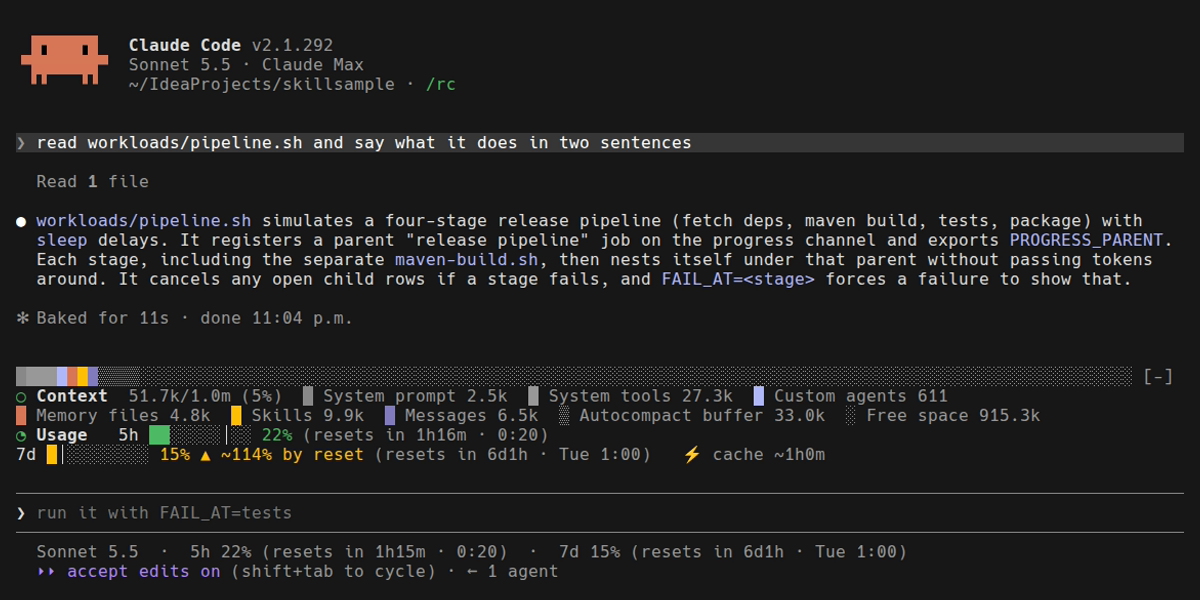
Version 0.1.0 returned only its own rows and hid every other mod in the band. That is fixed in 0.1.1.
Check it
claude plugin validate plugins/context-bar
claude plugin test plugins/context-bar
The tests cover the layout arithmetic: cells per category, the one-cell minimum, and the token formatting. They cannot cover the width the engine really gives the band — the first live recording showed the bar a few cells too wide, wrapping a stub onto a second row, because it was sized to the terminal rather than to the band (the engine keeps five cells at the right for its own [-] control). It is now sized to the band’s own width.
Claude Code vs Codex
Claude Code only. A mod is written against Claude Code’s hooks-module API; Codex has no surface for it. See Mods → Claude Code vs Codex.