Mindmap Prompt
Some ideas don’t arrive in order. You drop them, connect them, and then the shape appears. mindmap-prompt gives you a canvas for that, plus a deterministic compiler that turns the finished map into an organized Markdown prompt.
The compile step is plain Python — no LLM, no network. The same map always produces the same prompt.
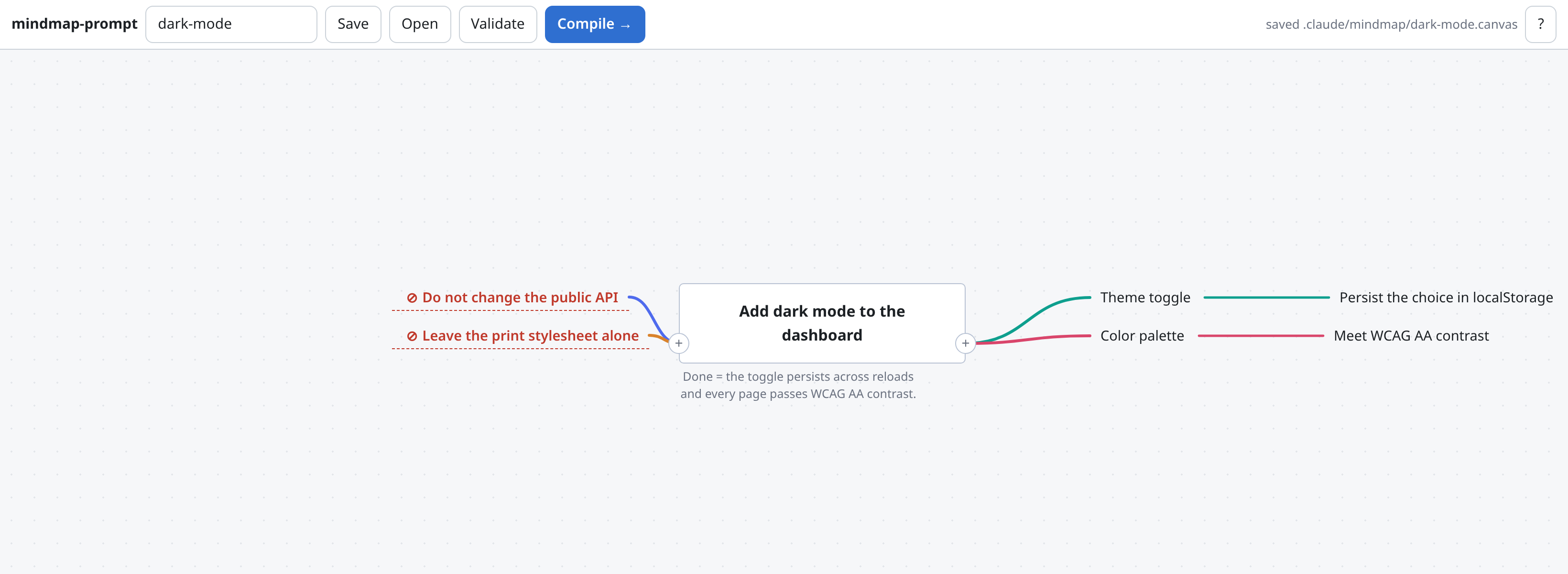
A map built on the canvas: the goal and its definition of done in the middle, features and ideas to the right, constraints — the things that must not change — in red on the left.
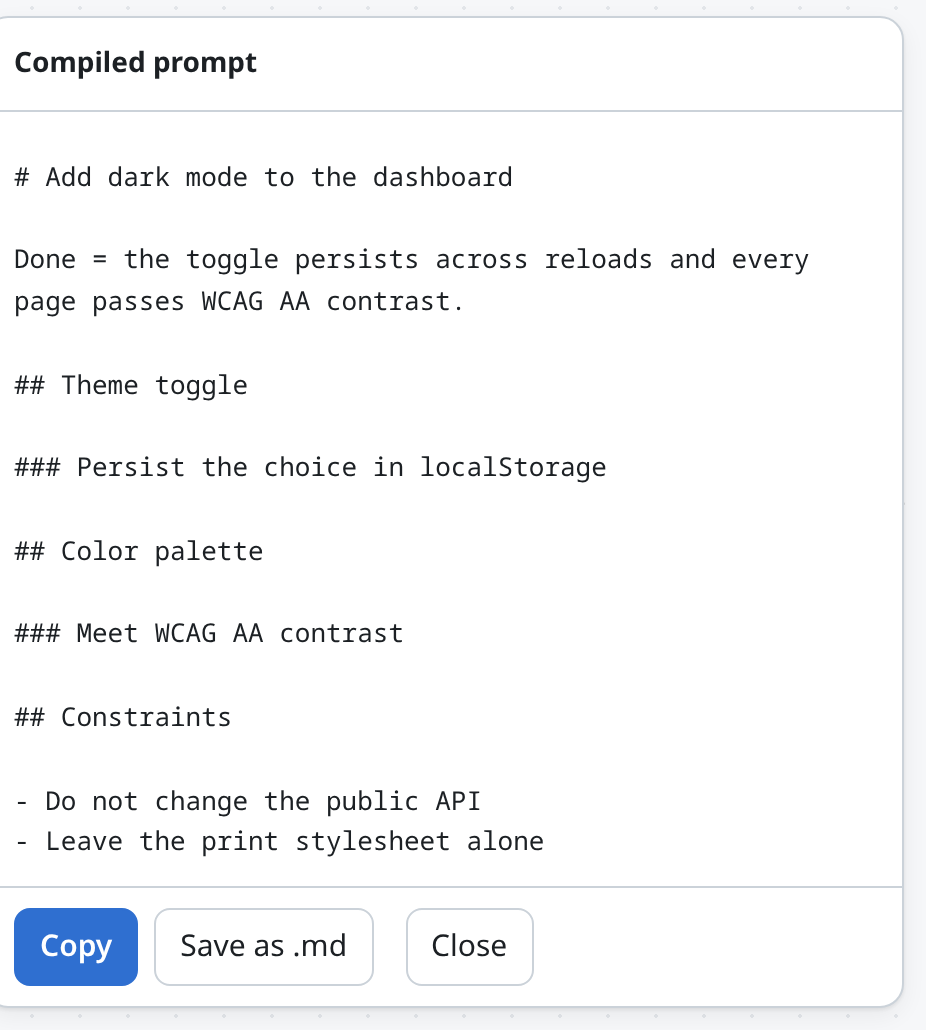
Press Compile and the map becomes an organized prompt: the goal as the heading, a section per branch, and the constraints gathered into their own list.
Open the canvas
python3 <plugin>/scripts/serve.py --cwd .Serves http://127.0.0.1:8770/. A fresh map starts with one root node, already focused — type over it, then branch with Tab, Enter or the + handle. To edit any node later, select it and just start typing. Or use the slash command:
| Command | What it does |
|---|---|
|
Start the canvas against the current repo (optionally on an existing map). |
|
Compile a saved map into a prompt — and act on it. |
|
Show the maps saved in this repo. |
Capture
Capture is keyboard-first, because stopping to hunt for a toolbar is what breaks a train of thought.
| Key | Does |
|---|---|
just type |
edit the selected node — typing replaces its text |
click, then click again |
edit a node (double-click works too) |
|
add an idea on that side; a fresh map opens with one root to type over |
|
commit + new sibling ( |
|
commit + new child |
|
new connected node in that direction |
drag |
connect two nodes (a cross-link) |
|
expand it with |
|
goal · feature · idea · constraint |
|
delete the selected node |
|
save |
|
validate + compile |
wheel / drag empty |
zoom / pan |
✦ Expand an idea with Claude
Select a node and hit its ✦ (or Ctrl/Cmd + .). Describe what you want, or take one of the quick actions, and the node is handed to claude -p running in this repo — so your CLAUDE.md and the project’s own vocabulary shape the answer.
| Action | Gives you |
|---|---|
Expand into ideas |
2–5 new child nodes under the selected one |
Break into steps |
the concrete steps the node takes to build |
Name constraints |
what must not change or break here |
Sharpen wording |
one rewritten line, replacing the node’s text |
Add done-criteria |
the node restated with a measurable definition of done |
Three things make this safe to lean on:
-
The repo is the context, and so is the map. The goal, ancestor chain, siblings and existing children travel with the request, and the prompt insists on ideas grounded in this codebase — naming real components, not advice that would fit anywhere. On an untouched map it takes its direction from the project alone.
-
Nothing is applied until you say so. Results land in the panel; you press Add to map or Replace the text. Close the panel and the map is untouched.
-
No tool that can change anything. By default the subprocess runs with no tools at all; with
--ai-read, onlyRead/Glob/Grep. It reads your project and writes prose — it can never edit a file, andargvis a list so nothing reaches a shell.
The control disappears entirely when the claude CLI isn’t on PATH, and serve.py --no-ai turns it off deliberately. --ai-model <name> picks a different model.
By default the subprocess runs with no tools at all — the repo’s CLAUDE.md is already in its context, and one turn keeps the call at a few seconds. For a project with no CLAUDE.md, --ai-read adds Read/Glob/Grep so it can look around instead; that grounds it better but costs several turns.
The four kinds
| Kind | Use it for | Where it lands |
|---|---|---|
goal |
the task, and what "done" means |
the |
feature |
a deliverable or major section |
a |
idea |
detail hanging off something else |
a nested heading |
constraint |
what must not change |
a |
Exactly one goal per map — it’s the entry point the compiler starts from. Kinds are stored as a leading tag in the node’s text (#goal Ship dark mode), so a .canvas file round-trips through Obsidian Canvas unchanged.
How a map becomes a prompt
-
Order comes from your layout. Siblings compile top-to-bottom, then left-to-right. You already arrange ideas spatially while thinking — that arrangement is the document order, so there’s no re-ordering step.
-
Structure comes from a spanning tree. Every node is owned by its shortest-path parent from the goal, so anything wired straight to the goal stays a top-level section. (A naive depth-first walk lets a long branch capture a node and bury it — this avoids that.)
-
Cross-links become references. A second edge into an already-placed node compiles to
→ see "That node"instead of repeating it. Cross-links and cycles are fine: nothing is duplicated, nothing is lost. -
Edge labels survive. Label an edge
depends onand it appears on the target’s heading.
Validation runs first
Compile always validates. Errors block; warnings don’t.
-
Errors — no goal, more than one goal, an empty node, a goal with no connections.
-
Warnings — nodes not connected to the goal; a goal that never says what "done" means.
-
Info — no constraints yet.
Orphan nodes are never silently dropped. Connect them, or compile with --include-orphans and they land under Unsorted notes.
Headless
The canvas is optional — the compiler is a normal CLI, so a map works in a script or in CI:
python3 <plugin>/scripts/mindmap.py validate .claude/mindmap/feature.canvas
python3 <plugin>/scripts/mindmap.py compile  .claude/mindmap/feature.canvas -o prompt.md
validate exits non-zero when the map has errors, so it works as a gate.
Storage & privacy
-
Maps live in
.claude/mindmap/.canvasin the *consuming repo — plain JSON, diffs cleanly, opens in Obsidian. -
The page itself makes no external requests and the server binds
127.0.0.1only. Capture and compile are fully offline. -
The one exception is
✦, which shells out toclaude -p— that call reaches Anthropic like any other Claude Code turn, and it sends the node plus its surrounding map. Nothing is sent unless you press it;--no-airemoves the control entirely. -
Zero dependencies: hand-rolled SVG and DOM, a stdlib Python server.
Deliberately not
A chain builder or an agent canvas. Tools like Langflow, Rivet and ChainForge wire up runtime pipelines; this compiles one prompt and gets out of the way.
Claude Code vs Codex
Tier 2 — needs tool translation.
| Claude Code | Codex | |
|---|---|---|
✦ expansion |
|
|
MCP servers |
The Claude runner’s normal configuration. |
Every configured MCP server is disabled for the call; if the configuration can’t be inspected, expansion stops before any model request. |
Commands |
|
Ask in plain language; start |
The difference that matters: Codex expansion is deliberately sealed off from project tooling; --ai-read opens local read-only exploration when you want it.
Install, hook trust and verified limits: Codex compatibility.