Mods
Most plugins in this marketplace are skills: instructions the model reads and follows. A mod is a different kind of plugin. It is code that runs inside Claude Code and draws on its screen — here, live bars above the prompt. The model never sees a mod, and a mod never asks the model anything.
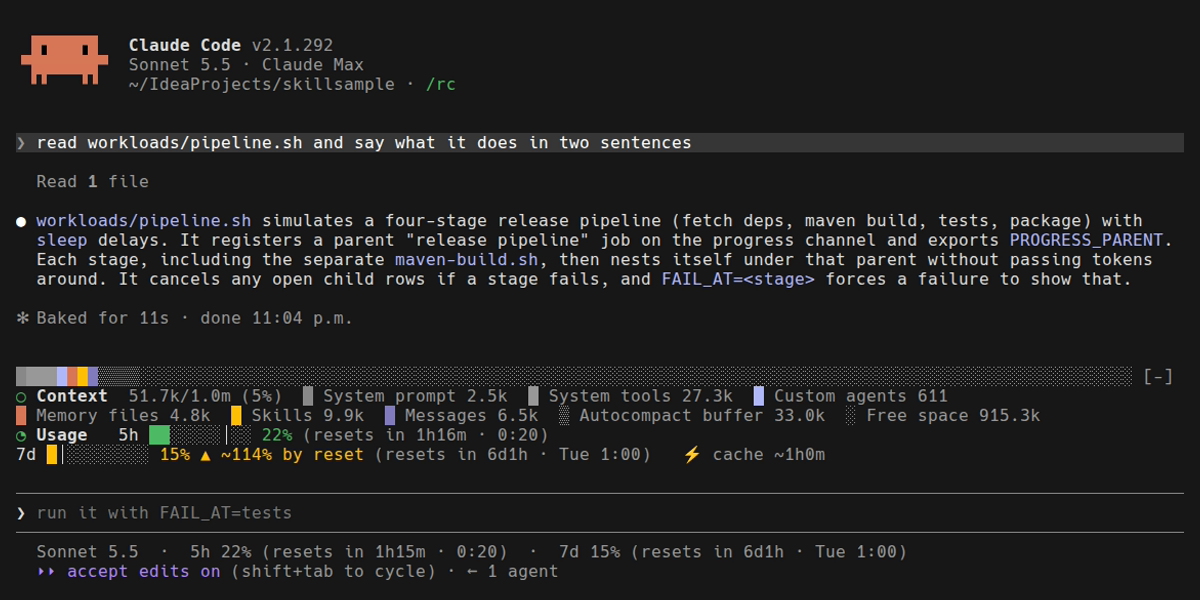
Both mods in one real session. The context bar and its legend sit above the two rate-limit bars, just over the prompt.
The mods
| Mod | What it draws | Toggle |
|---|---|---|
Your context window as one stacked bar, a colour per |
|
|
Your 5-hour and 7-day rate limits as two bars that turn yellow, then red, as you near a limit. |
|
|
Every long-running job in this session as a live bar with time left, sub-jobs nested. Part of the progress-channel plugin, not a separate install. |
|
Install
/plugin marketplace add alexmond/alexmskills
/plugin install context-bar@alexmskills
/plugin install usage-bar@alexmskills
Each mod starts switched on. Its slash command turns it off and on again, and the choice is remembered for the session.
Requirement: a Claude Code build that loads hooks modules (function-hook plugins). The screenshots on these pages were recorded on Claude Code 2.1.290. Builds without that support do not load hooks modules, so nothing is drawn.
What a mod costs
Nothing, on both counts:
-
No tokens. A mod has no skill file, so it adds nothing to the skill listing that every session loads, and nothing to any prompt.
-
No extra API requests.
context-barreads a local estimate of the context breakdown.usage-barreads the rate limits the last API response already reported.
Running more than one
The band above the prompt holds a single tree. A mod that returned only its own rows would hide every other mod drawing there, so each of these draws its rows and then whatever the rest of the chain draws. Install both and you get both, as in the screenshot above.
Earlier versions (context-bar 0.1.0, usage-bar 0.2.0) did not do this, so one mod hid the other. Update if you see only one bar.
Try one without installing
From a checkout of this repository:
claude --plugin-dir ./plugins/context-bar --plugin-dir ./plugins/usage-bar--plugin-dir loads a mod from disk for that session only, and saving a file in the folder reloads it.
What a mod is made of
plugins/usage-bar/
  .claude-plugin/plugin.json   # name, version, description — and "types"
  hooks/hooks.json             # { "modules": ["./register.tsx"] }
  hooks/register.tsx           # the hooks module: what it listens to, what it draws
  hooks/format.ts              # pure helpers (bar width, colour, countdown text)
  hooks/format.test.ts         # their tests
  types/index.d.ts             # the shape of the values it keeps for the session
The hooks module registers a slash command, refreshes its numbers when a turn completes, and answers the engine’s request to draw the band above the prompt. Everything that can be a pure function is one, in its own file with tests — the width of a bar, the colour for a percentage, the text of a countdown.
Check a mod
claude plugin validate plugins/usage-bar   # manifest + what the module hooks and calls
claude plugin test plugins/usage-bar       # its unit tests
Both run in seconds and need no session. They do not prove the mod draws correctly: the first live recording of context-bar showed its bar a few cells too wide, wrapping a stub onto a second row, though validation and every test passed. The recordings on these pages are part of how the mods are checked.
Claude Code vs Codex
Mods are Claude Code only. They are written against Claude Code’s hooks-module API and draw with its components; Codex has no equivalent surface. The generated Codex manifests list both mods so the catalog stays complete, marked as not adapted — installing one in Codex does nothing.
For a live view of long-running work that does work in Codex, see progress-channel, whose dashboard and terminal watcher are client-independent.