Prompt Coach — Configuration & Dashboard
Two ways to see and change what the coach does: a structured command surface, and a local web UI over the same data. Both read and write the same schema, so neither can drift from the other.
Start at the overview for what the coach is, or the rule catalog for what each rule catches.
Config surface
/prompt-coach:config is the structured surface over the coach’s config. It reads a CONFIG_SCHEMA metadata dict alongside DEFAULT_CONFIG, so new options are picked up automatically once they land in the schema — the dashboard, describer, and validator never drift.
| Verb | What it does |
|---|---|
|
Categorized dashboard with resolved value + source (default/global/repo) per key |
|
Resolved value only |
|
Full metadata: type, default, current, choices, example, since-version, description |
|
Enumerates legal values with per-choice explanations |
|
Validate against schema → deep-merge write to scoped config |
|
Remove an override / wipe the scoped config file (confirmation required) |
|
Show changed-from-default keys / print resolved config as JSON |
|
Mastery dashboard + resets (dry-run first) |
|
Acceptance ledger (v0.42) — rewrite accept/edit/reject rate, global + per rule |
|
Citation trail + doc URLs; add |
|
The skill’s own folders, state files, and runnable scripts; add |
|
Full-catalog analysis of a prompt or recent history |
|
Match a task to the closest Prompt-Library template, or print the taxonomy |
|
The consolidated dashboard JSON (what the web UI renders) — stats, rules, config, sources |
|
Interactive multi-choice config walk-throughs (via |
Flags: --scope global (default) or --scope repo chooses which config file writes go to. --dry-run on set/reset previews without touching disk. --json produces machine-readable output. Writes are deep-merged so forward-compat keys the schema doesn’t yet know about are preserved, not stripped.
The quick flow walks you through the high-value categorical settings (ack_clean, show_source_urls, praise_ratio, tips_enabled) with multiple-choice pickers.
All configuration keys
Generated from the plugin’s CONFIG_SCHEMA — the exact table the validator, describe, and the dashboard read — so it can’t drift from the code.
| Key | Type | Default | What it does |
|---|---|---|---|
|
bool |
|
Emit a compact ambient one-liner on a clean prompt (nothing else fired) confirming the coach ran + showing the active rule closest to mastery. A liveness heartbeat, not praise — distinct ✓ glyph, informational not evaluative. On by default; set false to go silent on clean prompts. |
|
int |
|
Rate-limit for ack_clean: emit the liveness line every Nth clean prompt. 1 = every clean prompt (default; a steady heartbeat). Raise to 5/10 for a quieter pulse. |
|
bool |
|
Make the collaborator block a real confirmation gate. Default false = honest proceed: the block says it’s proceeding (not 'reply yes to proceed'), Claude answers the same turn from the rewrite, and states which prompt it used (silence = accept; 'no'/'edit' next turn corrects). Set true to make Claude STOP after the block and wait for your yes/no/edit before doing the work — full control, at one extra round-trip per fired prompt. |
|
bool |
|
Master switch (v0.29+). When false, the coach’s UserPromptSubmit hook returns immediately without analyzing, logging, or emitting. Use |
|
bool |
|
When a rule fires, ground the collaborator rewrite in the closest gold-standard template from Anthropic’s Claude Code Prompt Library (a vendored, offline snapshot). On by default; the hint is only added when a confident task match exists. Set false to keep rewrites un-anchored. |
|
int |
|
FATIGUE CAP (v0.41+): max visible rewrites within nudge_window prompts; over the cap, fires are still logged and bookkept but the rewrite isn’t rendered. 0 disables. |
|
int |
|
Rolling window (in prompts) for the fatigue cap (v0.41+). |
|
int |
|
Skip all nudging until global prompt_count exceeds this number. Use to silence the coach for N prompts (say 'coach pause N'). |
|
bool |
|
Show full clickable doc URLs in the coach’s Sources line (the collaborator block), so you can Cmd/Ctrl-click to open the Anthropic guide section. On by default. Set false to show just the short anchor slug (e.g. 'be-clear-and-direct') and keep the block compact. |
|
int |
|
Minimum prompts between two fires of the same tip (v0.28+). Anti-nagging cap; the coach shouldn’t remind you about the same technique every few prompts. |
|
int |
|
Variable-ratio: 1 in N matching + cooldown-clear opportunities actually fires a tip (v0.28+). Lower = more frequent tips. |
|
bool |
|
Enable proactive tips (v0.28+): 💡 suggestions pointing at advanced techniques you could try. Distinct from rules which fire on prompt problems — tips fire on-topic for techniques you haven’t used. Fires on matching prompts (rate-limited) and on rule masteries (paired scaffolding). |
| Key | Type | Default | What it does |
|---|---|---|---|
|
int |
|
Minimum prompts between two fires of the same practicing rule (anti-nagging cap). |
|
list[str] |
|
Rule ids to permanently silence. Say 'coach off <rule-id>' to append or 'coach on <rule-id>' to remove. |
|
int |
|
Explore/exploit (v0.41+): re-admit one dormant rule every N prompts to refresh its acceptance estimate so a rule noisy in only one context isn’t buried forever. 0 disables. |
|
int |
|
Downstream-quality proxy (#30a): after an accepted or edited rewrite, watch this many substantive prompts for corrective signals (retries, re-coaching on the same rule, coach complaints). Folds into the per-rule ledger shown by |
|
int |
|
Clean prompts in a row a rule tracks as a recency/decay signal. Since v0.40 this no longer drives mastery (see min_demonstrations); it feeds the regression guard and the inactive-after default. |
|
float |
|
Hollow-accept detector (#30c): if within two prompts of accepting a rewrite you re-state the ORIGINAL ask with at least this token-jaccard overlap, the acceptance is counted hollow — adopted, then undone (v1.2.0). |
|
int |
|
Clean_streak with ZERO demonstrations after which a rule retires |
|
int |
|
Cap on practicing rules active at once. As lower-tier rules master, higher-tier ones activate up to this cap. |
|
int |
|
EARNED MASTERY (v0.40+). Number of times a rule’s mirroring positive detector must fire — i.e. times you actively USED the good technique — before the rule can master. Absence of the mistake no longer counts; demonstration does. |
|
int |
|
LEGACY (v0.27) evidence gate, superseded by min_demonstrations in v0.40. Retained for forward-compat; ignored by the demonstration-driven graduation path. |
|
int |
|
How many recorded accept/edit/reject outcomes a rule needs before the precision gate applies to it (v0.41+). |
|
bool |
|
Suppress rules whose advice the running model makes obsolete (e.g. don’t ask Opus 5 to verify — it already does). Set false to evaluate every rule regardless of model. |
|
str |
— |
Pin the model id the carve-out reasons about instead of reading it from the transcript. Leave unset outside tests. |
|
dict |
|
Per-model switch: model-id prefix → {rule or tip id: 'on'|'off'}. 'on' forces an item back on for that model despite a shipped gate; 'off' silences one. Longest matching prefix wins. |
|
float |
|
Acceptance-rate floor (v0.41+): a rule below this over min_outcomes_for_gating recorded outcomes is demoted dormant. Default 0.15 (only rules rejected ~85%+ of the time). |
|
bool |
|
ADAPTIVE ACTIVATION (v0.41+). When on, a rule whose acceptance rate (accepted+edited)/outcomes falls below precision_floor is demoted to |
|
bool |
|
In honest mode (collaborator_gate=false), if a collaborator rewrite was rendered last turn and you move on without objecting, record that as an implicit acceptance (v0.49+). Populates the acceptance ledger so precision-gating has a denominator; without it the ledger stays near-empty and gating never activates. Explicit 'no'/'redo' still counts as a rejection. Ignored in gate mode. |
|
int |
|
Clean prompts since the last fire required alongside the demonstrations for mastery (v0.40+) — proves no active relapse at the moment of graduation. |
|
list |
|
DECAYING MASTERY (v0.41+): expanding review schedule in days of NON-USE. A mastered rule unused past the current interval decays to |
| Key | Type | Default | What it does |
|---|---|---|---|
|
obj |
|
Auto-demote a mastered rule that fires threshold+ times within window prompts. Shape: {enabled, threshold, window}. Off by default — surprise reactivation feels punitive. |
|
int |
|
Cooldown between refresher fires on mastered rules. 10x the practicing cooldown by default. Set to 0 to disable refresher firing (permanent silence on mastered rules). |
| Key | Type | Default | What it does |
|---|---|---|---|
|
bool |
|
Silence all praise but keep nudges. Praise+correction on the same prompt would dilute both (Kohn). |
|
int |
|
Don’t repeat the same praise phrasing within N praises. |
|
bool |
|
Celebrate when you correct the exact thing you were nudged on in the previous prompt. |
|
bool |
|
Celebrate whenever a rule graduates to mastered. |
|
int |
|
1 praise per N clean prompts with a positive fire (variable-ratio, Kohn’s don’t-dilute threshold). Lower = more frequent. |
| Key | Type | Default | What it does |
|---|---|---|---|
|
int |
|
Levenshtein distance for typo normalization (0 disables). Adaptive: distance-1 for short tokens (≤6 chars), distance-2 for longer. |
| Key | Type | Default | What it does |
|---|---|---|---|
|
obj |
|
Opt-in stub. If enabled AND no rule fired via regex AND the prompt is long, an optional model call would classify against the rule catalog. Deferred until real-use data justifies it. |
Web dashboard (v0.44+)
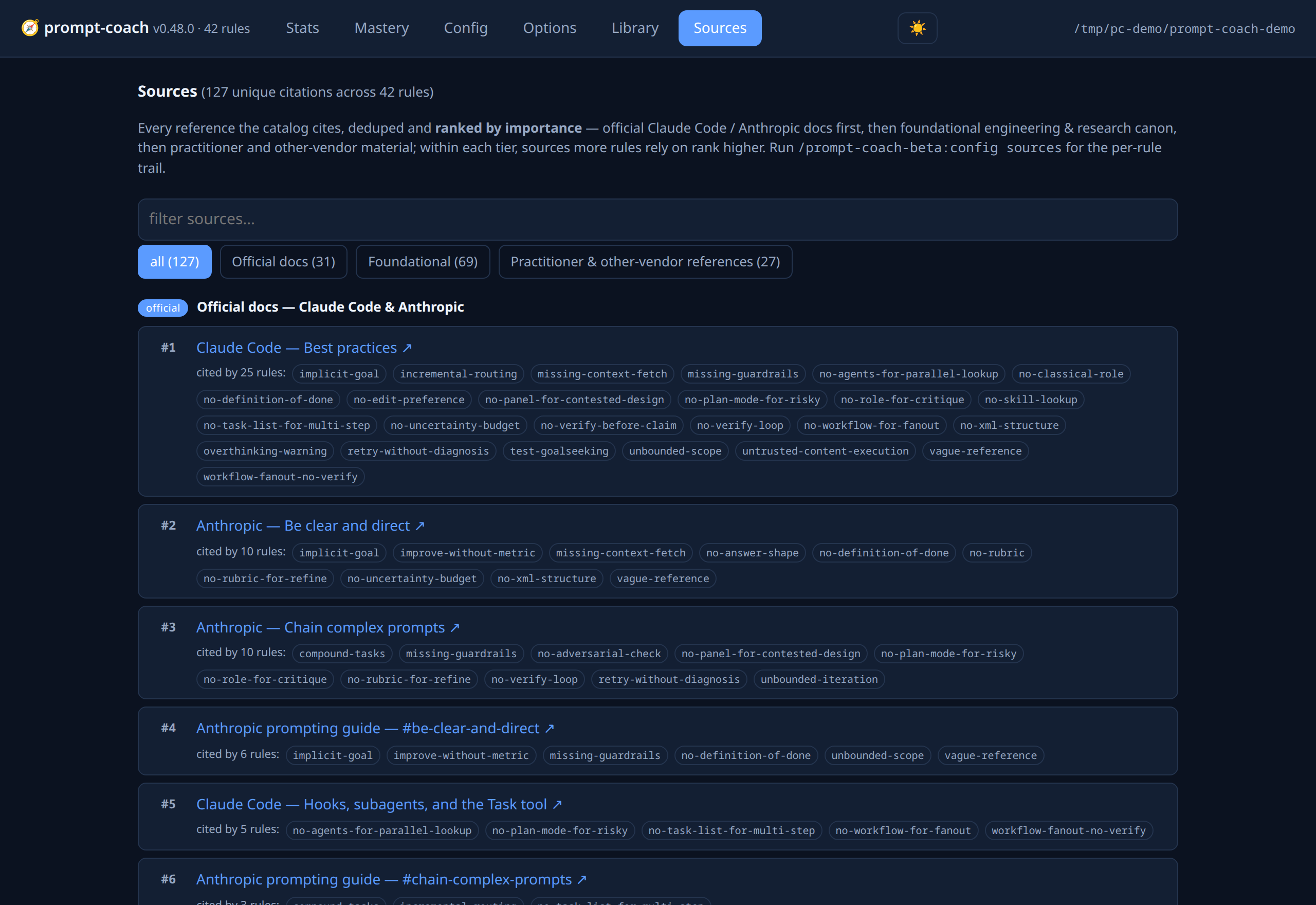
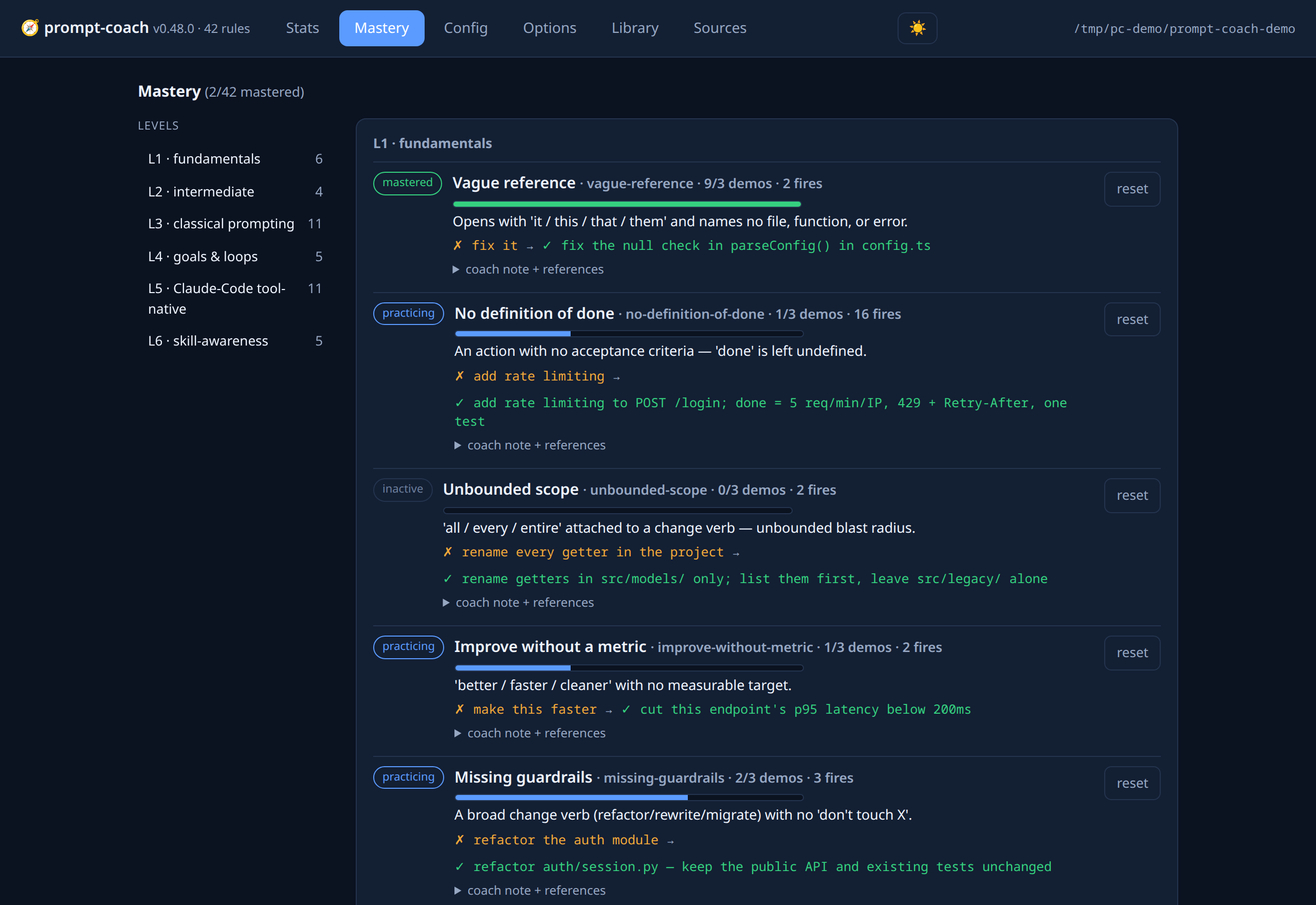
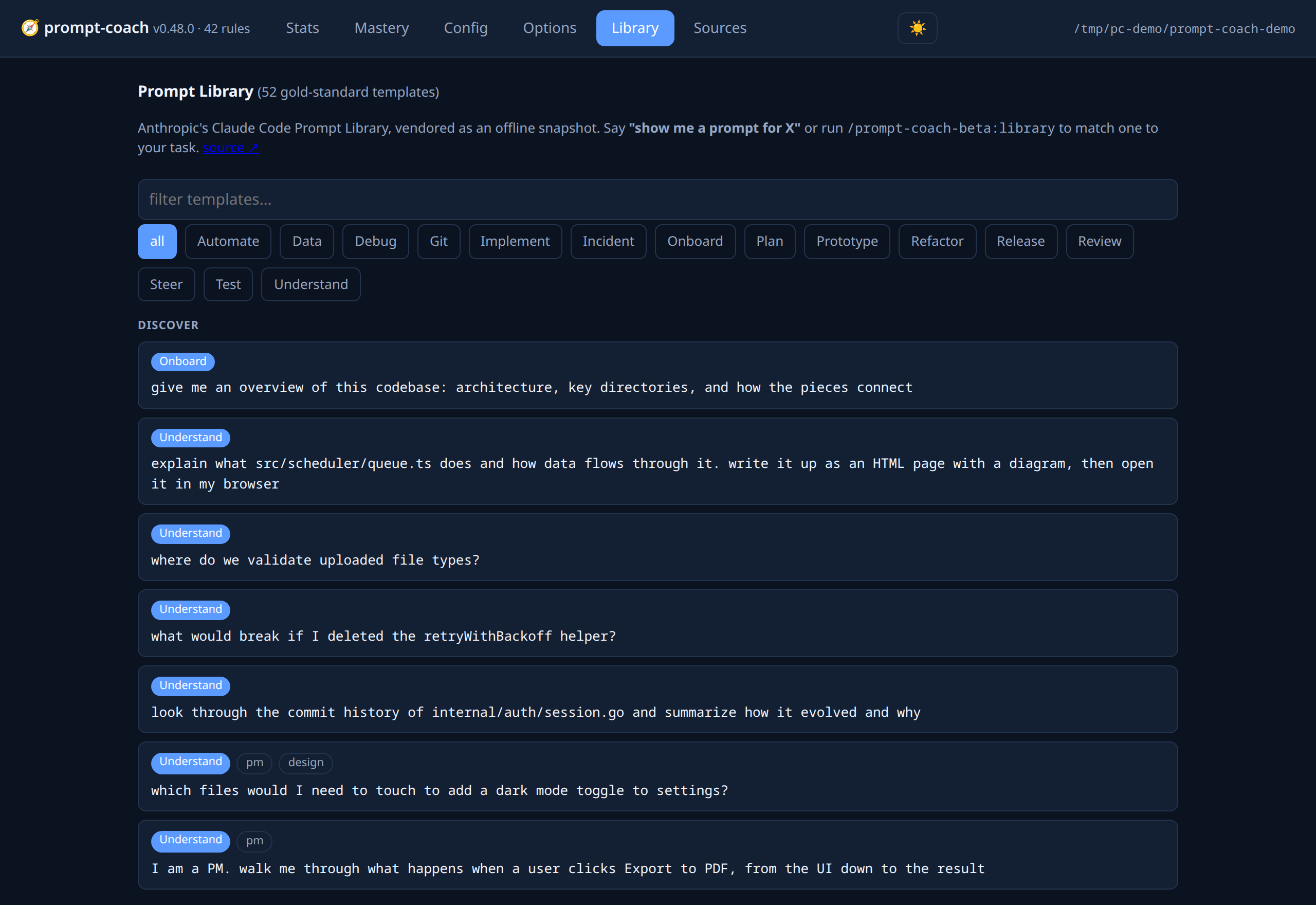
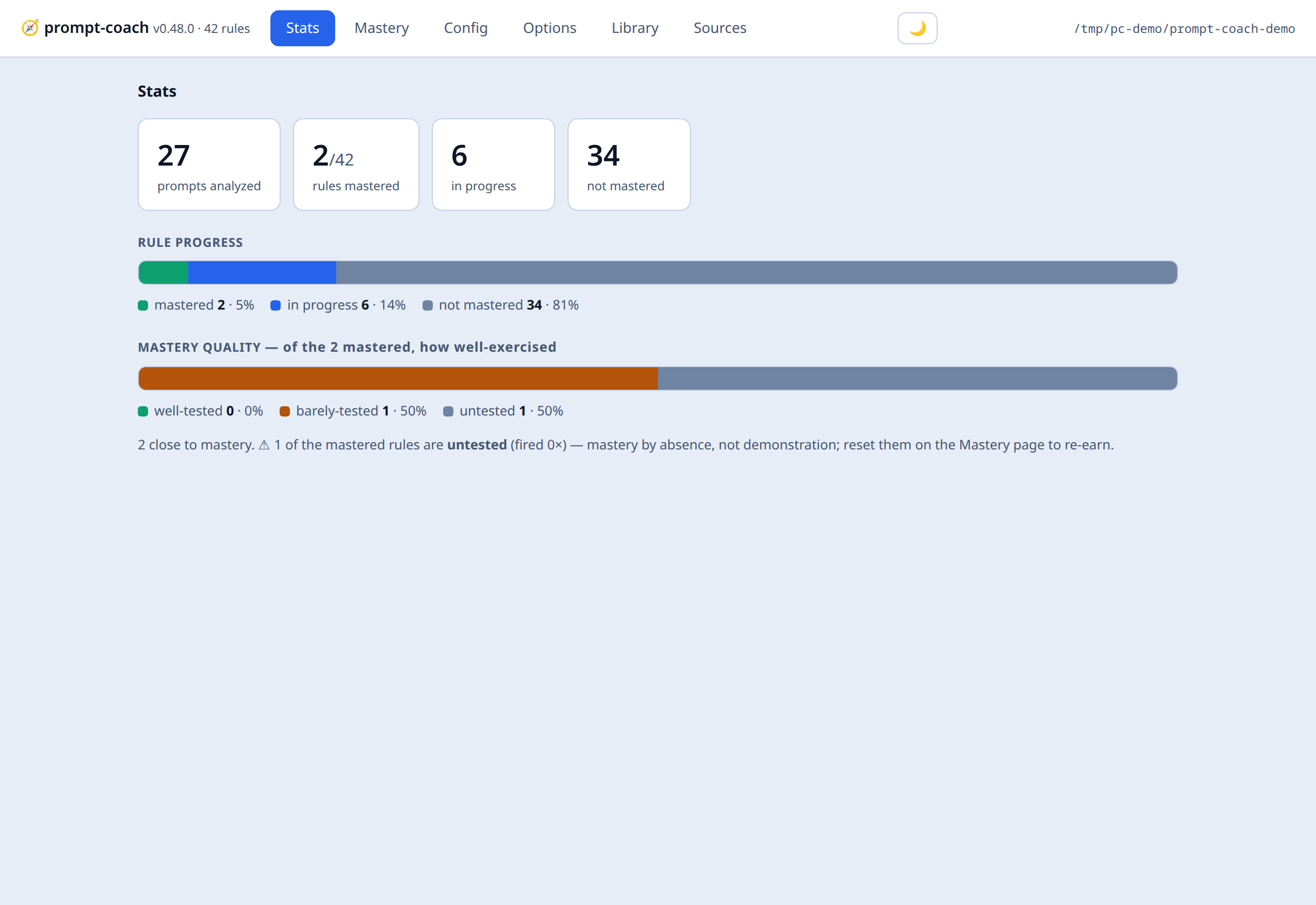
/prompt-coach:dashboard launches a lightweight local web UI — a zero-dependency (Python stdlib only) server (scripts/serve.py) bound to 127.0.0.1. Six tabs give you the whole picture of your prompting at a glance:
-
Stats — prompts analyzed, and mastered / inactive / in-progress / dormant counts, with rule-progress and mastery-quality bars.
-
Mastery — every rule grouped by tier (L1–L6) with a status badge,
demos/minprogress, fires, its guidance, a ✗ bad → ✓ good example, clickable reference URLs (Anthropic guide + every cited source), and a per-rule reset button. -
Config editor — every schema key with its description and a type-aware control (checkbox / number / select / text) that saves live to the chosen scope (global or repo).
↺resets a key to default. -
Options — reset-all-mastery, refresh, open the Anthropic guide.
-
Library — browse Anthropic’s Prompt Library templates by phase / category / role, with a text filter.
-
Sources — every citation in the catalog, deduped and ranked by importance: official Claude Code / Anthropic docs first, then foundational engineering & research canon, then practitioner / other-vendor material; within each tier, a source more rules rely on ranks higher. Each entry links out and lists the rules that cite it, so you can trace the whole evidence base in one place. Filter by tier or free text.
Light or dark, your call. The dashboard follows your OS theme by default and ships a one-click toggle (🌙 / ☀️ in the toolbar) that persists your choice:
Reads and writes reuse config.py’s `build_dashboard / api_set / api_action, so schema validation and scope rules are identical to the CLI — the UI is a view + thin write path, not a second implementation. Local-only, no auth by design (don’t bind it off-host). For the raw consolidated JSON without the server: config.py --cwd <repo> dashboard.
Prompt Library integration (v0.47+)
The coach doesn’t only tell you what’s wrong with a prompt — it can hand you the right one. It vendors an offline snapshot of Anthropic’s Claude Code Prompt Library (52 gold-standard, tagged, slot-templated prompts across 5 SDLC phases and 15 categories) and matches your task to the closest template with a zero-dependency keyword/tag matcher (no network, no embeddings — cheap enough to run in the hook).
Two touchpoints:
-
On-demand lookup —
/prompt-coach:library "<task>"(or just say "show me a prompt for X") returns the closest template(s), which Claude then offers to adapt to your actual file paths and run.config.py librarywith no query prints the taxonomy. Browse them all on the dashboard’s Library tab. -
Rewrite grounding — when a rule fires and
library_hintsis on (default), the collaborator rewrite is anchored to the closest template’s phrasing and slot structure, so your improved prompt matches Anthropic’s house style. The hint is only added when a confident task match exists (a weak match is worse than none).
The snapshot lives at data/prompt-library.json; refresh it deliberately with make library-refresh (runs scripts/gen-prompt-library.py, which fetches + parses the live docs page). The prompts are Anthropic documentation content, vendored with attribution — not this plugin’s work.
The same snapshot doubles as a calibration corpus for the coach itself: running the analyzer over all 52 gold prompts surfaces which rules over-fire on genuinely good prompts (make library-audit).
Source URLs and skill access (v0.36+)
-
Clickable sources — the coach block’s
Sourcesline renders the full Anthropic-guide URL so your terminal linkifies it (Cmd/Ctrl-click to open). Toggle withshow_source_urls. -
config sources <rule> --open— opens the rule’s guide URL + every cited source in your default browser. -
config paths— exposes the skill’s own local files (plugin root,SKILL.md,docs/sources.md, resolved config/state/log) as openable paths, plus the analyzer and config scripts with their exact run commands.--openlaunches the folder + docs.
State layout
~/.claude/prompt-coach/
├── config.json        # global config (enabled, thresholds, disabled_rules)
└── state.json         # global mastery ledger

<repo>/.claude/prompt-coach/
├── config.json        # per-repo overrides
├── state.json         # per-repo fires, reactivations
├── log.md             # rolling log of coaching + prompt previews
└── candidates.jsonl   # flagged bad-call candidates